

Official WordPress plugin
The ultra-light WordPress CMP. Live in 2 minutes.
A minimalist plugin with zero impact on performance. Paste your Property ID to activate a tailored banner and configure Google Consent Mode v2. Manage styles, stats, and GDPR consent exports from a single dashboard.
Free plugin · WordPress 6.0+ · PHP 7.4+ · CookieFort 7-day trial
A connector, not an embedded CMP
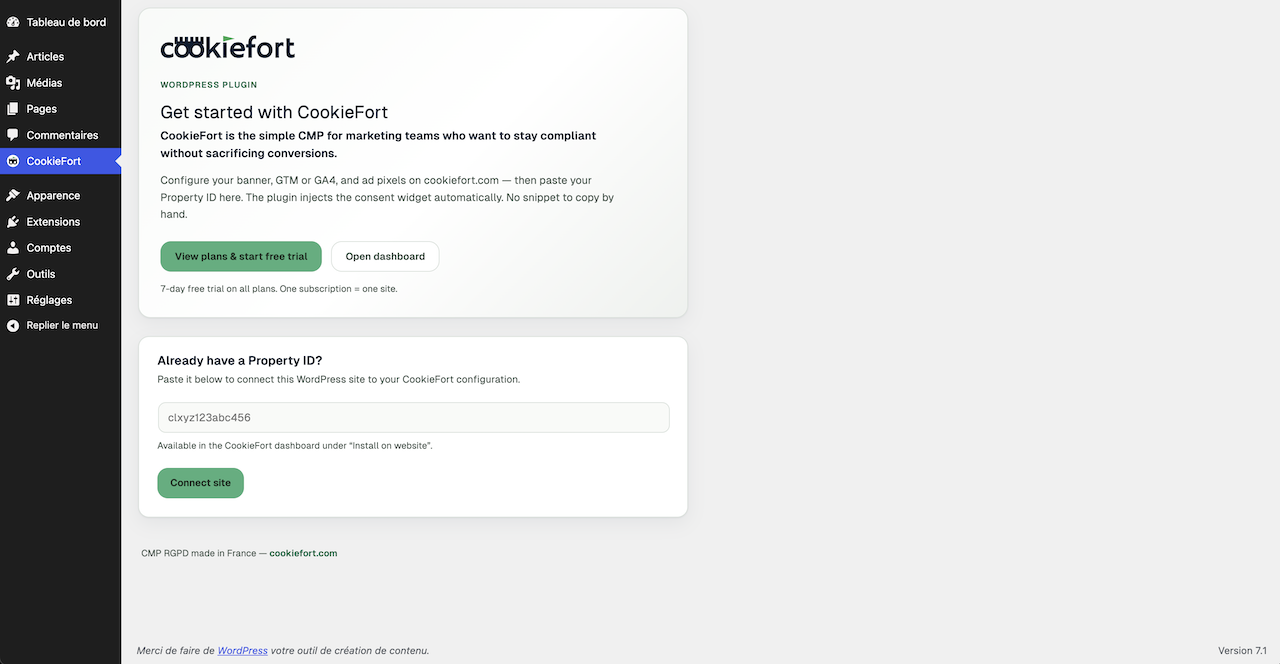
WordPress only stores the Property ID. Banner copy, styles, categories, and Consent Mode stay in CookieFort — less maintenance on the site.
- One Property ID in the WordPress admin — no theme snippet to paste or maintain.
- The CMP banner is loaded remotely by the CookieFort widget (not a heavy CMP inside the CMS).
- Widget updates ship from CookieFort; the plugin stays thin and easy to update from wordpress.org.
- Install and update from the marketplace without touching theme code.
In 4 steps
- Create a CookieFort account and add your site (Property) in the dashboard.
- Configure the banner and tracking mode (GTM or GA4) in step 1.
- Install and activate CookieFort Consent Manager from the WordPress plugin directory.
- Paste your Property ID in the CookieFort admin menu, save, then verify “installation detected” in the dashboard.
What the plugin does for you
- - Free plugin on wordpress.org (WordPress 6.0+, PHP 7.4+).
- - Automatic CookieFort widget injection from your Property ID.
- - In GA4 mode, injects the gtag.js snippet aligned with dashboard config.
- - Google Consent Mode v2 (Basic or Advanced) handled by the CookieFort widget.
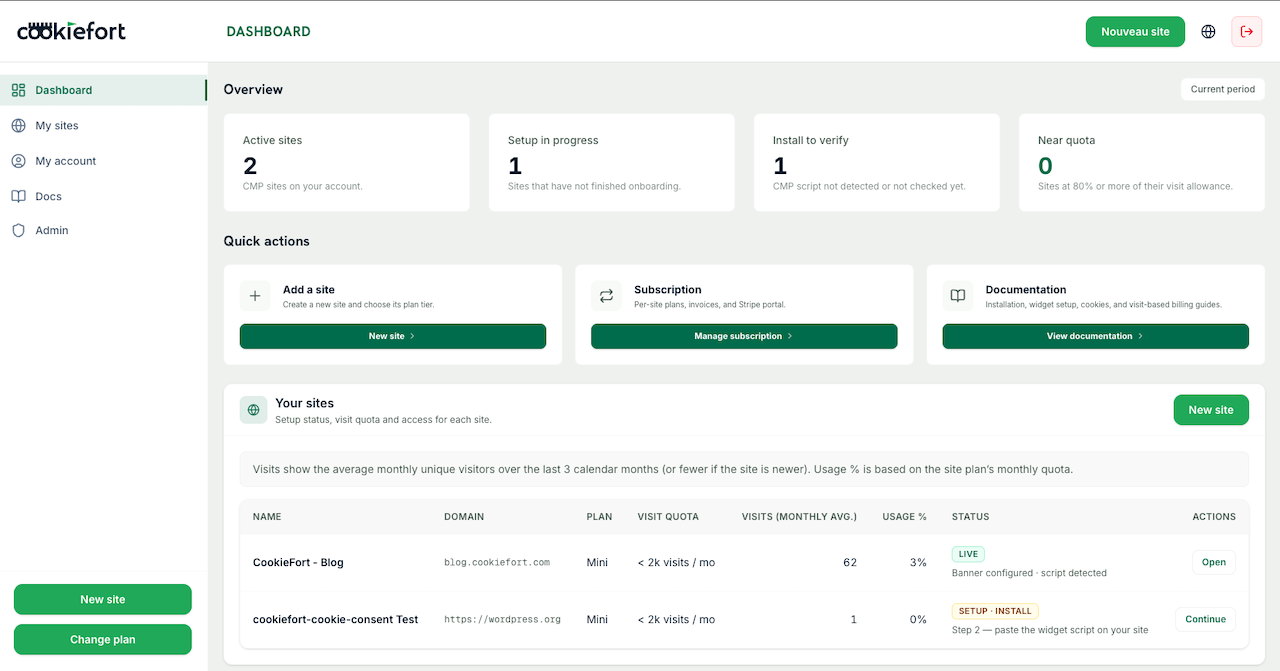
- - Banner customization, cookie scanning, and consent proof in the CookieFort dashboard.
Preview
WordPress back office (Property ID) and the CookieFort dashboard where you configure the CMP.
Requirements and limits
- - A CookieFort subscription and Property ID are required — the plugin alone does not configure the banner.
- - Installing the connector does not make your site compliant by itself: categories, tracking, and cookies must be set up in CookieFort.
- - The plugin does not declare the WP Consent API yet: consent is managed by the CookieFort widget on the front end.
- - Clear cache (plugin / CDN) after activation and verify the banner in a private session.
Validation checklist
- - Banner appears on first load.
- - Accept / Refuse / Configure work correctly.
- - Preferences can be reopened (floating button or /#cookiefort-manage-cookies).
- - Dashboard detects the installation.
- - Ad pixels load only after marketing consent (if enabled).
Frequently asked questions
Do I need a CookieFort account?
Yes. The plugin connects your WordPress site to CookieFort via a Property ID. Without a subscription and Property, the banner will not load.
Where do I find the Property ID?
In the CookieFort dashboard, open your site: the Property ID is shown on the site page / integration script view.
GTM or GA4 with the plugin?
Choose the mode in the CookieFort dashboard (Installation step). The plugin injects the widget; in GA4 mode it may also inject gtag.js based on that config.
Does the plugin integrate the WP Consent API?
Not yet. Consent is managed by the CookieFort widget on the front end. Plugins that rely only on the WP Consent API are not synced automatically.
Does the plugin store banner configuration?
No. Texts, styles, and categories are loaded by the widget at runtime. WordPress only stores your Property ID (and cached tracking metadata).
How much does the plugin cost?
The WordPress plugin is free. Using the CMP requires a CookieFort plan (7-day trial on self-serve plans).
Ready to connect CookieFort on WordPress? Install the plugin, create your account, then paste the Property ID.